ZERO-TRUST USER-SIDE SECURITY
Phished Assistant™
The patent-pending inbox-side isolation layer for email and browser security that helps employees read and click safely, even when threats bypass traditional filters, so phishing doesn’t turn into incidents or tickets.
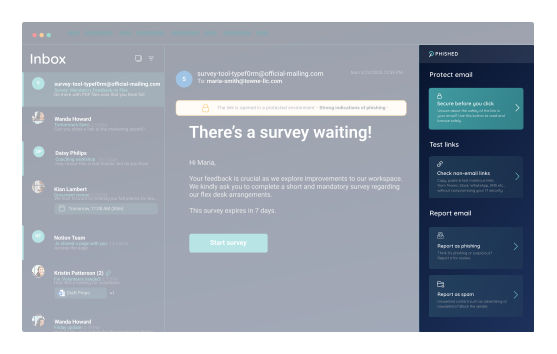
No more phishing-related tickets
The Phished Assistant gives employees a safe way to read emails and open links without relying on IT. As a result, phishing-related tickets have dropped dramatically and our security team can focus on real threats.

THE REAL PROBLEM
The Inbox Is Where Phishing Detection, Productivity, and IT Workloads Collide
Email security and AI phishing detection still miss threats that lead to BEC, increasing IT workload.

EMPLOYEES STILL CLICK
Even with training, employees still click links and open attachments. When a message looks legitimate, one wrong move can trigger business email compromise.

INBOX NOISE WASTES TIME
Suspicious emails, graymail, and newsletters take time to sort, review, and clear—pulling employees away from productive work.

IT TEAMS ARE OVERWHELMED
Security teams spend too much time reviewing emails, resolving false positives, managing end-user quarantines, and responding to user requests.
GLOBAL PATENT PENDING
How the Phished Assistant adds a Zero-Trust Security Solution for Inbound Email
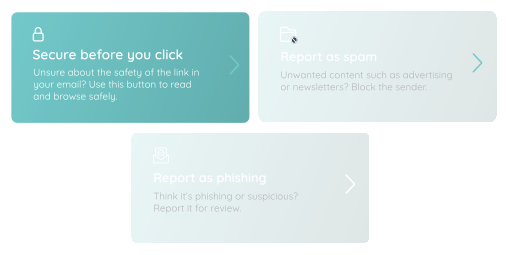
Secure Before You Click — with inbox-native isolation
Traditional email security solutions try to detect threats before they reach the inbox. The Phished Assistant assumes some threats will inevitably reach the inbox—and the interaction stays fully isolated from your infrastructure.
Get AI Coaching in the Moment of Interaction
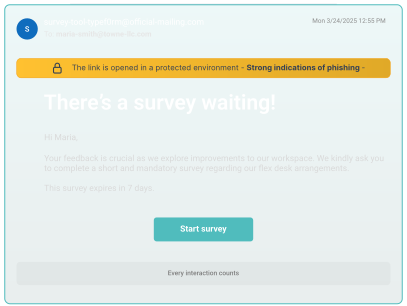
The Phished Assistant analyzes inbound email signals in a protected environment and highlights suspicious content directly in the inbox. Employees get clear guidance in the moment so they can act safely without relying on IT.
Automate Email Threat Resolution
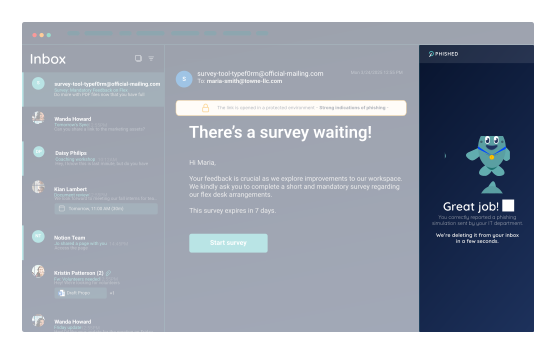
Employees can remove phishing, spam, and graymail from the inbox in one click with built-in mailbox protection—resolving suspicious emails themselves instead of creating phishing tickets.
Trusted by 6,500 customers and 250 partners








SEE HOW IT WORKS
Phished Assistant™
1. Secure Before You Click
The Assistant lets employees open suspicious emails safely.
2. Isolated Email View
The email opens in a protected view. Even if an employee clicks a malicious link, the interaction stays fully isolated from your infrastructure.
3. AI Risk Guidance
The Assistant flags phishing indicators within your email security service and recommends safe next steps in real time.