Phished vs SoSafe: Security Awareness Training Compared
Phished vs SoSafe is a comparison between two European security awareness training and human risk management platforms. Both run adaptive phishing simulations, an e-learning curriculum and a report button, and both ship an AI assistant for employees. The difference is what that assistant does at the moment an employee is unsure: SoSafe's Sofie answers questions and pushes alerts in chat, while the Phished Assistant opens the suspicious email, link or attachment itself in an isolated environment and returns a verdict before anyone acts.
Generative AI has removed the old giveaways. Phishing mail now arrives in flawless German, French or English, references real colleagues and real suppliers, and often comes from an account that passes every authentication check. For buyers in the DACH region, where SoSafe is strongest, and for teams preparing for NIS2, the deciding question is narrow: when that message lands, which platform makes it less likely to become an incident?
Phished
- AI runs every simulation for you
- Every risk checked before the click
- A click stays harmless in isolation
- Phished Academy ready on day one
SoSafe
- Programme curated by an admin
- Chatbot gives general advice only
- A click triggers coaching afterwards
- Reviewers call the training repetitive
What should a security awareness training programme deliver?
Any programme worth paying for covers two layers. The first is knowledge: an employee should understand what phishing is, why NIS2 or DORA applies to their role, and how GDPR shapes the way they handle data. Courses, quizzes and certificates take care of that layer. The second is reflex: what the same employee actually does at 16:45 on a Friday when a plausible invoice arrives. Simulations, reporting and live guidance work on that layer.
On principle, SoSafe and Phished stand on common ground. Both were built in Europe, both favour encouragement over blame, and both localise training rather than shipping it in English only. The real split is on the reflex layer: how much of it runs without an admin, and whether the employee has any protection at the second they hesitate. Each section below comes back to those two points.
How many employees does each layer actually reach?
A phishing test feels like coverage. In practice it touches very few people, and the research now says so plainly.
At Black Hat 2025, two independent research teams (University of Chicago with UC San Diego, and ETH Zurich) presented results on simulation-based training. In the American study, a randomised controlled trial covering close to 20,000 staff, training embedded in simulations improved failure rates by roughly 1.7%. The reason is structural: in a typical campaign only around one employee in ten fails, so nine in ten never see the lesson at all.
- Simulations reach the minority who fail a test. Colleagues who ignored, deleted or correctly spotted it walk away with no input.
- Reporting reaches anyone who presses the button, on simulated and genuine mail alike. Its limit is confidence: people only report what they are already fairly sure about.
- Live AI guidance reaches the people in between: they don't fail, they don't report, they just pause, make a private judgement and move on. Ask any security team and this hesitant middle is their biggest population.
The chart shows Phished's internal estimate of the share of phishing exposure each layer turns into a learning moment.
Phished vs SoSafe: feature comparison
| Capability | Phished | SoSafe |
|---|---|---|
| Simulation engine | Fully automated: AI writes, personalises and sends every simulation. Scenarios are based on real attacks your colleagues reported and on your actual suppliers | Adaptive difficulty per user; an admin builds and translates custom templates in Template Studio |
| Channels protected at the moment of risk | The real message is checked in isolation wherever it lands: inbox, attachments, browser, SMS and QR-code links, and links shared in Microsoft Teams, Slack, WhatsApp and Zendesk | No live protection found; these channels are only rehearsed through simulations |
| Languages | 32 languages, with a Translation Agent that localises simulations and training while keeping their layout intact | Multiple languages, with AI translation of custom templates |
| Who builds the training content | Phished maintains the Academy curriculum. AI agents add your own material: policy documents become training levels, prompts become modules, old SCORM courses become interactive lessons | E-learning library whose depth depends on the tier bought |
| Repeat-offender handling | Risk groups form automatically. Each group gets its own protection level, from extra lessons to approval steps to Zero Incident Mail™ (ZIM) isolation | Adaptive difficulty per user plus interventions suggested by the Human Risk OS Intervention Hub |
| Reporting feedback | Every report, simulated or genuine, gets an instant AI verdict with an explanation, and harmless cases close themselves | Instant only for simulations; real reports wait for triage first |
| In-workflow AI guidance (pre-click) | Yes. The Phished Assistant opens the doubtful email, link or file in an isolated silo and tells the employee what it found, before they act | No. The report button shows AI hints that SoSafe says are not a final assessment; nothing is opened in isolation |
| Behavioural risk scoring | Behavioural Risk Score™ (BRS) for each employee, calculated from Phished's own simulation, reporting and Assistant data and fed straight into risk segmentation. Works without extra security tooling | Human Security Index, strongest when fed by third-party tools such as Okta, Entra ID or CrowdStrike |
| Compliance framework mapping | Academy content aligned with NIS2, NIST, DORA, ISO 27001/27701, GDPR, SOC 2 and HIPAA; NIS2 implementation templates; certificate per level | Supports ISO 27001, GDPR, DORA and TISAX alignment |
| Admin workload model | No triage backlog: AI analyses every report and resolves about 99% automatically, finished simulations disappear from inboxes, suspected threats move to spam. The admin only reviews the few genuine threats, with the AI's findings and a recommended response already prepared. Wizard-based setup of roughly 30 minutes | An admin triages real reports, curates templates and sends Sofie alerts |
| Core integrations | Microsoft 365, Google Workspace, the Phished Assistant in Microsoft Teams, Slack and Zendesk, SSO/SAML, SCIM and directory sync, SIEM, plus its own MCP server | Outlook, Gmail, Microsoft Defender, Teams, Slack, Okta, CrowdStrike |
| Access from AI assistants (MCP) | Native MCP server: admins can work with Phished directly from Claude, ChatGPT or Gemini | No MCP server found in SoSafe's public documentation |
| Pricing model | Published plans (Core, Advanced, All-In-One) from $175 a month per platform, not per user | Four quote-only tiers, priced per user; Sofie sold as an add-on |
1. Phishing simulations: Phished vs SoSafe
Adaptive difficulty is standard on both platforms, so it decides very little. The more useful test is month eighteen: is the programme still fresh, still targeted, and still running if the person who launched it has left?
On Phished, that question has no owner because it needs none. The engine decides who gets which simulation and when, using role, country, language, sector and each person's track record, then raises or lowers the bar as they improve. Its pool of more than 4,500 templates in 32 languages, sent from more than 1,200 sending domains, keeps employees from learning to recognise "the test" instead of the threat.
Two AI agents make the content local. Threat Radar takes genuine phishing that colleagues reported, defangs it, and sends it back out as training, so the drill is the attack your sector is actually seeing. Supply Chain researches your own suppliers and writes simulations in their name, the way a targeted attacker would.
SoSafe takes a hands-on route. Its Adaptive Difficulty Engine adjusts the difficulty of each person's simulations, and Template Studio lets an admin generate a custom template from a prompt, or recreate one from a screenshot of a real phishing mail, then translate it with AI. That is a capable toolkit, and somebody owns the job of using it.
So the platforms spend effort in different places. SoSafe relies on an admin to keep the rehearsals relevant. Phished automates the rehearsals and adds protection in the live moment: when a dubious SMS, QR code or Teams link appears, the employee opens it via the Phished Assistant, which isolates it and talks them through it on the spot.
2. Training content and EU compliance: NIS2, GDPR, DORA
Being European, both vendors handle GDPR natively and both sell to organisations working through NIS2 and DORA. "Supports compliance" therefore tells you nothing. What matters is how much audit evidence the training produces by itself.
Phished ships the curriculum finished. Phished Academy is a structured path of short, interactive lessons, built to teach rather than entertain: each one ends with exercises in which employees apply what they just learned. It is kept up to date by Phished and aligned with NIS2, NIST, DORA, ISO 27001/27701, GDPR, SOC 2 and HIPAA. It includes project-based templates for NIS2 implementation, and employees earn Bronze through Platinum certificates as they progress, which gives an auditor a dated record per person. Nobody on your side drafts or approves anything before launch.
If you want your own material in it, AI agents handle the conversion. Upload a policy and the Policy Transformer turns it into a lesson employees actually complete. The Policy Evaluator checks content against the relevant legislation, the SCORM Agent brings over courses bought from a previous vendor, and the Translation Agent localises lessons and simulations without breaking their layout.
SoSafe offers a large e-learning library, gated by tier. Its published plan comparison raises the number of advanced lessons as you move up from Essential to Ultimate, and it documents alignment with ISO 27001, GDPR, DORA and the automotive standard TISAX. TISAX is worth noting: if you supply the German automotive industry, it is a framework SoSafe names explicitly. On G2, repetitive content is one of the drawbacks reviewers mention most, with users citing long videos they cannot skip or speed up.
For an audit, what counts is proof per person. Phished gives every employee a dated certificate per level, and because your own policies can become Academy lessons, that record covers your internal rules as well as the regulation. Auditors see who completed what, and when, without anyone assembling spreadsheets.
3. Repeat offenders and risk scoring
The employee who clicks for the fourth time is a test of a vendor's philosophy. Shaming that person feels decisive and makes things worse, because people who fear blame stop reporting. SoSafe, set up by behavioural scientists, takes the same view; here the vendors genuinely agree.
They part ways on what to do while the behaviour is still changing. SoSafe measures and advises. Its Human Risk OS combines Human Behaviour Sensors, a Human Security Index and an Intervention Hub that suggests interventions per group. The index can take in telemetry from Okta, Microsoft Entra ID and CrowdStrike, which pays off for organisations that already run those tools and have an analyst to interpret the combined picture.
Phished measures and protects. Groups such as new joiners, first-time clickers, repeat clickers and people with a low Behavioural Risk Score are identified and updated without anyone maintaining a list. For each group, the admin chooses how much safety net to add:
- Extra training. Short lessons aimed at the exact mistake the group keeps making.
- AI approval. Phished checks a link before the person can open it or type anything into it.
- Self approval. A deliberate confirmation step before any link opens, enough to interrupt an automatic click.
- IT approval. For the riskiest profiles, nothing opens until IT has approved it.
The strongest setting is Zero Incident Mail™ (ZIM). For users under ZIM, incoming mail is opened inside an isolated environment by default, without them doing anything. A malicious link executes in that silo and never touches the laptop or the network. Suggested interventions need time to work; ZIM makes the click harmless the same day.
4. Reporting: instant answers on real and simulated mail
Of all the practice mechanisms, reporting has the widest reach, because anyone can use it on any message. Each report is a small lesson, as long as the answer comes back while the employee still remembers why they pressed the button.
For a simulation that's trivial: the platform knows it sent the email. For genuine mail it's hard. Someone has to decide whether it is dangerous, and in a classic setup that means a ticket waits for an analyst, and the employee hears back much later, if at all.
SoSafe's Phishing Report Button handles the easy case well. It runs in Outlook and Gmail, and an employee who reports a SoSafe simulation gets immediate positive reinforcement. Before reporting, Reporting Nudges show AI hints about tone and content; SoSafe's own documentation describes these as a helper that is not intended to replace the user's assessment. Real reports go to Threat Inbox, SoSafe's triage hub, or are forwarded to Microsoft Defender or an abuse mailbox. The employee's feedback email is linked to the classification, so it arrives once the report has been classified.
Phished answers genuine reports the same way it answers simulated ones: instantly. AI analyses the message and tells the employee what it is and why. A good catch is confirmed; a harmless email comes with a brief explanation, so nobody feels foolish for asking. About 99% of reports are resolved this way without anyone in IT touching them. Likely threats are moved to spam automatically and finished simulations are cleared from inboxes, so IT only sees the handful of reports that require a human decision.
Even fast feedback has a blind spot, though. A report button only helps people who have already decided something is wrong. Most employees never get that far, and the next section is about them.
5. AI assistants for employees: the Phished Assistant vs SoSafe Sofie
Because both vendors call their tool an assistant, buyers often assume they do the same job. They don't.
Sofie is a security chatbot. It lives in Microsoft Teams, Slack and email and has two main jobs. Instant Alerts lets the security team push a warning, such as an active phishing campaign, to targeted groups in minutes. Level Zero Support answers employees' security questions from the knowledge files you upload, falls back to a general AI answer with a disclaimer when it cannot find one, and can open an IT ticket. It is a communication channel: it tells employees about threats in general, but it never looks at the specific message an employee is unsure about.
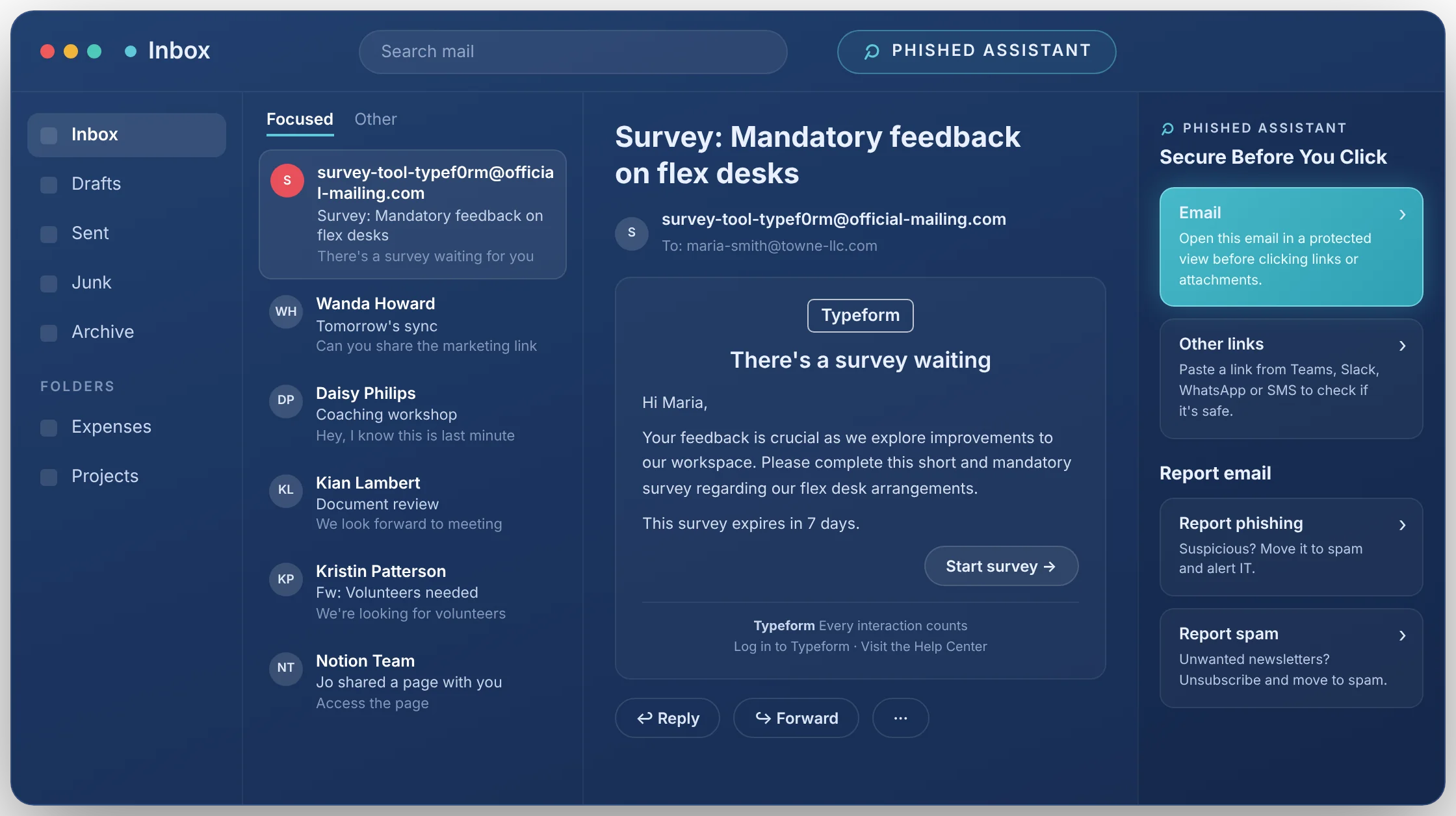
The Phished Assistant deals with the actual message. An employee who isn't sure about an email, a link, a file or a web page opens it via the Phished Assistant. It loads in a sealed digital silo away from company systems, gets inspected, and the result is explained before the employee commits to anything. They can click through and look around in the silo without risk. It works in the inbox and the browser, and on links that turn up in Microsoft Teams, Slack, WhatsApp or Zendesk.
Put simply: ask Sofie "how do I spot a fake invoice?" and you get general advice about invoices. Hand the Phished Assistant the invoice that just arrived, and you get an answer about that invoice, opened somewhere it can do no harm. Sofie's closest equivalent for a specific email is the Reporting Nudges hint inside the report button, which SoSafe explicitly says should not be relied on alone. We found no isolated environment for opening suspicious links or attachments in SoSafe's public documentation.
Against AI-generated phishing, that is the gap that counts. Hints, filters and policy answers all judge a message from outside, using signals a capable attacker can now fake. Isolation doesn't rely on those signals: the content is opened and examined in the silo, so even a message the filter waved through and the employee clicked cannot reach your systems. A chatbot can tell an employee what phishing looks like. Only isolation makes the click on the real one harmless.
6. Admin time: what each platform asks of your team
Business cases for awareness training rarely count admin hours, yet for a small security team that number often decides whether the programme survives its second year.
Phished is built so the programme keeps running when nobody is watching it. Simulations, report analysis, containment and Assistant checks are automated end to end. What reaches the admin is only the small set of genuine threats, already analysed, with the next steps laid out. Getting started takes a guided setup of around 30 minutes. In practice, the AI resolves about 99% of reported emails automatically, so the admin only works on the roughly 1% that are genuine threats.
SoSafe's model keeps a person in the loop, and supports that person well. Someone triages real reports in Threat Inbox or wires the report button into Defender, someone builds and translates custom templates in Template Studio, and someone writes and sends Sofie alerts. SoSafe provides a customer success manager and best-practice guidance to help. That suits a team with a full-time awareness manager. Where awareness is one task among many, those weekly jobs are what gets postponed first.
7. Pricing: Phished vs SoSafe
SoSafe doesn't publish prices. Its four tiers (Essential, Professional, Premium, Ultimate) are quoted per user, and Sofie is sold as an add-on. The only public reference is a UK G-Cloud 15 reseller listing: £21.79 to £64.58 per user per year, excluding VAT.
Phished publishes its Core, Advanced and All-In-One plans, starting at $175 a month for the platform rather than per user.
When comparing quotes, check whether the employee assistant, risk scoring and compliance training are included.
Is Phished the right SoSafe alternative for you?
The common ground is real: both vendors design training around behaviour rather than blame, both draw on behavioural science, and both treat GDPR as a baseline rather than a feature. Where they invest differs. SoSafe's model depends on an admin to run the programme, and its risk index is at its best when fed by third-party security tools. Phished scores behavioural risk from its own data with the Behavioural Risk Score™, runs the programme automatically, and protects the employee at the second they hesitate over a real message.
Choose SoSafe if you…
- Have a dedicated awareness manager who wants hands-on control over templates and campaigns
- Want human-risk signals correlated from Okta, Entra ID and CrowdStrike in one index
- Supply the German automotive industry and need TISAX named explicitly
- Prefer a vendor headquartered in Germany
Choose Phished if you…
- Want a programme that runs itself, so your security team spends its time on genuine threats
- Want suspicious emails, links and attachments opened in isolation before anyone clicks
- Need NIS2, DORA, ISO 27001 and GDPR training evidence from day one
- Measure success in incidents prevented, not in lower click rates
Phished vs SoSafe: the bottom line
SoSafe is a strong, established European platform for teams with a dedicated awareness manager who wants to run the programme hands-on. Phished starts from a different assumption: the decisive moment is the one when a real message arrives, so that is where its AI works. Simulations and feedback run unattended, ZIM shields the users most likely to click, and the Phished Assistant gives a hesitant employee a safe place to check before acting. Over 7,100 organisations, with around 2 million users between them, have chosen that approach.
Phished vs SoSafe: frequently asked questions
Is SoSafe better than Phished, or vice versa?
It depends on how much admin time you have. SoSafe relies on an admin to curate templates and triage real reports. Phished automates the programme end to end and is the only one of the two whose employee assistant opens a doubtful email, link or attachment in isolation before the employee acts. If protection at the moment of risk matters most, Phished is the better fit.
What are the best SoSafe alternatives?
Phished is a direct SoSafe alternative for European organisations that want behaviour-based training with less admin work and protection before the click. For a wider view of the market, see our overview of the top 10 security awareness training platforms in 2026.
How much does SoSafe cost?
SoSafe does not publish prices on its website. It sells four tiers (Essential, Professional, Premium, Ultimate) priced per user, with the quote depending on headcount and features. A UK G-Cloud 15 reseller listing quotes £21.79 to £64.58 per user per year, excluding VAT. Phished publishes a starting price of $175 per month for the platform.
What is SoSafe Sofie, and is it the same as the Phished Assistant?
No. Sofie is an AI chatbot in Microsoft Teams, Slack and email that sends security alerts and answers employees' security questions from your uploaded knowledge base. The Phished Assistant works on the suspicious item itself: it opens the email, link or attachment in an isolated digital silo, analyses it and tells the employee whether it is safe before they act.
How much does a phishing simulation cost?
Most vendors bundle phishing simulations into a security awareness training licence rather than selling them separately, so the price depends on headcount and plan. Phished includes automated, AI-driven simulations from its Core plan upward.
Do Phished and SoSafe support NIS2, GDPR and DORA?
Both are European vendors that address these regulations. Phished Academy content is aligned with NIS2, NIST, DORA, ISO 27001/27701, GDPR, SOC 2 and HIPAA, and adds NIS2 implementation templates and a certificate per level. SoSafe documents support for ISO 27001, GDPR, DORA and TISAX.
Which platform requires less hands-on management?
Phished. Simulations, report analysis and containment run automatically, admins only review the small share of reports that are genuine threats, and the guided setup takes about 30 minutes. With SoSafe, an admin stays involved in triaging real reports, building custom templates and sending Sofie alerts, with help from a customer success manager.
About this comparison
Written by the Phished team. Phished is a security awareness and human risk platform used by more than 7,100 organisations. Everything we say about SoSafe comes from its own product pages and support documentation, its G-Cloud marketplace listing and its pricing page, checked in November 2026. If we could not find a capability in those public sources, we state that we could not find it, rather than claiming it is missing. If something here has changed, let us know and we will update the page.
See the Phished Assistant at work
In a demo we show the Assistant handling a suspicious message in isolation, the programme running without admin effort, and how a rollout would look for your team.
Request a demo