Best Phishing Simulation Platform in 2026: The Top 10 Compared
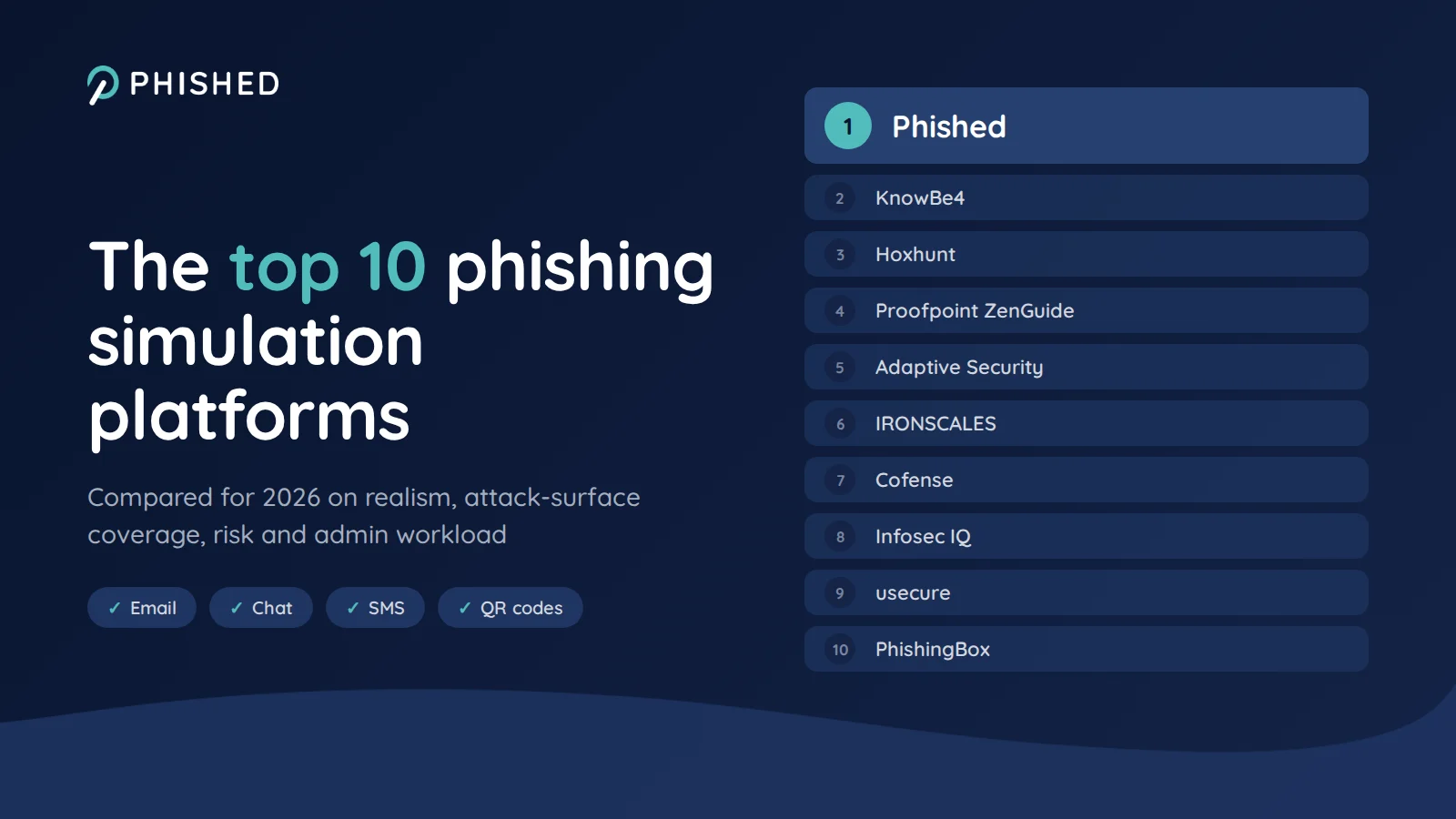
The best phishing simulation platform in 2026 is Phished, followed by KnowBe4, Hoxhunt, Proofpoint ZenGuide and Adaptive Security, then IRONSCALES, Cofense, Infosec IQ, usecure and PhishingBox. A phishing simulation platform sends realistic but harmless phishing lures to your own employees to test and train how they respond. Because AI now makes phishing hard to tell apart from legitimate messages, the strongest platforms in 2026 go beyond testing: they also guide employees at the moment they meet a real threat.
Phishing simulation is the most common way organisations test how their people respond to phishing. The market has split into quite different approaches: large content libraries you curate yourself, adaptive programmes that run on autopilot, simulations bolted onto email security, and newer platforms built around deepfake voice and SMS attacks. Choosing well depends on knowing which approach fits your team.
There is also a limit to what a simulation can do on its own. On average only around 10% of employees click a given test, so in most programmes only those who click receive a training moment at all, and the many who neither click nor report are never reached. And attackers no longer stick to email: they use SMS, QR codes, chat apps and calls, where a test alone protects no one. A 15-month study of more than 14,000 employees by ETH Zurich and research presented at Black Hat USA 2025 both found that simulation-based training produces limited lasting behaviour change on its own. That is why this guide also asks what each platform does when an employee meets a real threat, not only how many tests it can send. For the wider category, see our top 10 security awareness training platforms in 2026.
How we evaluated each phishing simulation platform
- Simulation realism and personalisation: how closely simulations match real attacks on your organisation, and whether they adapt to each employee rather than going out as one campaign to everyone.
- Attack-surface coverage: how much of the real phishing attack surface the programme covers, through simulation or real-time guidance: email only, or also chat, SMS, QR codes and the web.
- Learning moment for every employee: whether employees who report, hesitate or click all get immediate, blame-free feedback, not only the minority who click a test.
- Risk measurement and action: a behaviour-based risk score that segments employees and lets you act on each group, rather than a click rate alone.
- Admin workload: how much campaign design, scheduling, report triage and setup the platform automates.
- Relevance to your organisation: whether scenarios are built from your own context, such as your suppliers, the tools your employees use and the threats they actually report.
Each platform was assessed against these six criteria using its own public product documentation in 2026, and the criteria were combined into a single order. Phished scores highest on each of them, which is why it ranks first; aspects outside these criteria, such as library size and language count, are covered in each entry and in the comparison table. Where a platform leads on one criterion and trails on another, its entry says so. How the shortlist was built is set out in the methodology at the end of this guide.
The 10 best phishing simulation platforms in 2026
Phished: self-running phishing simulation software, plus isolation at the moment of contact
Phished is an AI-native platform with one goal: zero incidents caused by human error. More than 7,100 customer organisations use it, covering around 2 million users. Its adaptive phishing simulations are set up once and then run on their own: AI agents adapt every simulation to the employee's job role, location, language and skill level, so two colleagues never receive the same one at the same time. New scenarios can be built from a single prompt, from the organisation's real suppliers or from threats colleagues have reported, and Phished suggests the themes that catch your own people out most. Admins can also run campaigns, check who needs support or pull reports straight from Claude, ChatGPT, Gemini or Copilot over MCP, and nothing goes live without their approval. Employees who click get blame-free training on the spot, and every simulation, report and training moment feeds their Behavioral Risk Score™ (BRS).
What puts Phished first is that it goes beyond the simulation. The Phished Assistant covers the full human attack surface, from email, attachments and the browser to Teams and Slack, SMS and WhatsApp, QR codes and links in AI tools, with the same reflex on every channel: don’t guess, check. Its main differentiator is isolation, a zero-trust approach applied to the human layer: when an employee is unsure about anything, the Assistant opens it in a digital silo that is fully isolated from the organisation's infrastructure, and the AI coaches them in real time before they act. Even after a misclick, malicious content never reaches the employee's device: instead of an incident, there is a learning moment. Phished is the only platform in this guide that isolates content this way, and it has filed a global patent application for the technology.
Pros
- A verdict before anything runs: AI analyses a suspicious email, link, file or message in the moment and tells the employee whether it is safe
- Isolation as a zero-trust layer: anything an employee doubts opens in a digital silo, so a malicious link or file never reaches the device
- IT gets the record, not the workload: every report is analysed automatically, the employee gets instant feedback, and potentially malicious emails are moved to spam to block further clicks
Cons
- Built around behaviour change rather than a vast template library, so teams that mainly want thousands of off-the-shelf templates to pick from will find a more focused, AI-generated set
- Designed to run on autopilot, so teams that prefer to hand-build and schedule every campaign themselves will find less to configure manually
- Broader in scope than a pure simulation tool, which can be more than a team that only wants periodic phishing tests needs
KnowBe4: the largest content library and the category benchmark
KnowBe4 has been the best-known name in security awareness since its founding in 2010, and it is the benchmark most buyers compare against. Its platform pairs phishing and vishing simulations with a very large training library, and reports a Phish-prone Percentage, KnowBe4's own click-likelihood metric, alongside a per-user Risk Score. See our Phished vs KnowBe4 comparison for a feature-by-feature breakdown, or the top 10 KnowBe4 alternatives if you are looking to switch.
Pros
- Largest customer base and content library in the category
- Long enterprise track record, which can ease procurement in large organisations
- A name most auditors and boards already know, which makes the choice easy to defend internally
Cons
- Built for a security operator who curates campaigns and reviews flagged reports, which keeps much of the workload with IT
- Generic templates need tailoring before they reflect your own suppliers, tools and threats
- No isolation of real threats at the moment of contact; protection relies on training and coaching
Hoxhunt: gamified simulations, curated by admins
Hoxhunt is built around adaptive phishing training with positive reinforcement. Admins select simulations from a threat-led library that Hoxhunt updates regularly, or build their own in Content Studio, and simulations run across email, SMS, voice and callback, Microsoft Teams and deepfake video. Stars, badges and a company leaderboard encourage participation, and reported emails get an automated verdict. Pricing is per employee, quoted after a 30-minute scoping call. See our Phished vs Hoxhunt comparison for the detail.
Pros
- Gamification with stars, badges and leaderboards for teams that want competition to drive participation
- Long-standing presence in the Nordic market, where the company was founded
- Established enterprise customer base
Cons
- Custom training content is built by admins in Content Studio, which adds a build-and-review step to the team's workload
- Real threats outside the inbox, such as links in Teams or Slack, SMS messages and QR codes, get no support once they reach the employee
- No isolation layer for real threats: once a message gets past the email filter, the employee has to judge it alone
Proofpoint ZenGuide: threat-intelligence-driven simulations for Proofpoint customers
Proofpoint's security awareness product is now marketed as ZenGuide. Its simulations draw on the threat intelligence behind Proofpoint's email security business, and AI ThreatFlip turns real attacks into training material, while the Satori Phishing Simulation Agent recommends simulations. The Human Resilience Workbench tracks high-risk users and benchmarks behaviour change against industry peers.
Pros
- Reuses threat intelligence from Proofpoint's own email security, a natural fit for existing customers
- Industry benchmarking of behaviour change through the Human Resilience Workbench
- One vendor for email security and awareness training in large Proofpoint estates
Cons
- No isolation of real threats at the moment of contact; protection relies on email filtering and training
- Much of the advantage depends on already running Proofpoint email security
- Teachable-moment landing pages are available in 17 languages, so some employees see them in a second language
Adaptive Security: phishing simulation focused on executive impersonation
Adaptive Security is the youngest platform on this list. It launched publicly in January 2025 and has raised $55 million in Series A funding from Andreessen Horowitz and the OpenAI Startup Fund, the fund's first cybersecurity investment. Its focus is AI-driven social engineering: simulations use AI-generated personas, including deepfaked voices of real colleagues, across voice, SMS, email and video.
Pros
- A young company founded specifically to counter AI-driven social engineering
- Impersonation scenarios tailored to executives, finance and help-desk staff
- Fast-moving product with strong investor backing, including the OpenAI Startup Fund
Cons
- The shortest track record on this list: founded in 2024 and publicly launched in January 2025
- Focused on simulating attacks rather than stopping real ones; no isolation at the moment of contact
- A fast-expanding product line, from deepfake training to email security and AI governance, that is still young in each area
IRONSCALES: phishing simulation for existing IRONSCALES customers
IRONSCALES is primarily an AI-driven email security platform, with security awareness training and unlimited phishing simulation testing included in its human risk management tier. Its Phishing Simulation Agent uses open-source intelligence to aim simulations at high-risk employees, and the same platform remediates real phishing that employees report.
Pros
- A natural add-on for teams already running IRONSCALES email security
- Unlimited simulation testing included in the human risk management tier
- A free Starter plan for Microsoft 365 organisations that want to try simulation testing
Cons
- Simulation and training are part of an email security bundle rather than a standalone programme
- The free Starter plan is limited to four training campaigns a year, and the full awareness programme is a separate paid suite
- Protection centres on the inbox, so threats that arrive by SMS, QR code or chat are not covered
Cofense: phishing simulation from a long-standing phishing specialist
Cofense started in 2011 as PhishMe, one of the first phishing simulation companies, and still runs its awareness offering on the PhishMe engine. Simulations cover email, SMS, QR codes and voice, including callback phishing, and many customers turn the month's most-reported real phish into their next simulation. The one-click Cofense Reporter button feeds Cofense Triage, which helps the security operations team work through what employees report. Cofense can also run the simulation programme as a managed service.
Pros
- Long track record in phishing defence, dating back to PhishMe in 2011
- A natural fit for organisations already using Cofense to detect and respond to phishing
- Managed simulation service for teams without in-house capacity
Cons
- Strongest when a security team works the report queue; less suited to organisations without one
- Long-term behaviour change is secondary to the response workflow
- The workflow starts after a report, with no isolation or real-time guidance for the employee at the moment of contact
Infosec IQ: template variety with training attached to every simulation
Infosec IQ, from Infosec Institute, offers a library of more than 2,000 phishing templates with new ones added regularly, and every template is paired with microlearning about that specific email. An employee who fails a simulation immediately sees the red flags they missed. Simulations can be run from spoofed or look-alike domains to mirror real attacker techniques, and the library includes 700+ training modules.
Pros
- A large template library of 2,000+ emails for teams that build their own campaigns
- Backed by Infosec Institute's wider catalogue of technical security certification training
- Spoofed and look-alike domain options for teams that want to mirror attacker techniques closely
Cons
- Campaign design relies more on the admin than on automation
- Templates come from a shared library, so tailoring them to your own suppliers and internal tools means manual work in the editor
- No isolation or real-time guidance when an employee meets a real threat
usecure: phishing simulation for small IT teams
usecure, through its uPhish product, positions itself around automation for managed service providers and small IT teams. Users are enrolled automatically through Microsoft 365 or Google Workspace, phishing campaigns run on autopilot, and adaptive training targets each user's weak spots. Alongside simulations, the platform covers policy management with e-signature tracking and dark web monitoring, and its multi-tenant portal lets MSPs manage many clients. Training runs in 20+ languages, and a free trial is available.
Pros
- Dark web monitoring for exposed employee credentials
- A long-standing focus on small and mid-sized businesses
- Free trial, so MSPs can test it with one client before committing
Cons
- Oriented towards SMB and MSP environments, with a thinner enterprise footprint
- The product is split into separate modules (uLearn, uPhish, uBreach, uPolicy), so admins work across several tools to run one programme
- No isolation or real-time guidance when an employee meets a real threat
PhishingBox: a basic phishing simulation tool for small teams
PhishingBox is a phishing simulation and training platform that publishes its pricing, which is still unusual in this category. On annual billing for 50 employees, the Standard plan costs $16.50 per seat per year and the Professional plan, which adds a built-in learning management system, $23.93 per seat, with a 14-day free trial that needs no credit card. Callback phishing tests are part of the Enterprise plan. Templates and landing pages can be created with built-in AI tools, and the KillPhish add-in handles employee reporting and escalation of suspicious email.
Pros
- Published per-seat pricing and a 14-day free trial without a credit card
- KillPhish add-in for reporting and escalating suspicious email
- Optional built-in LMS for SCORM training content
Cons
- Built for admins who run their own campaigns, so the programme depends on in-house time
- No isolation or real-time guidance when an employee meets a real threat
- A smaller training library than the larger awareness suites
Phishing simulation software compared at a glance
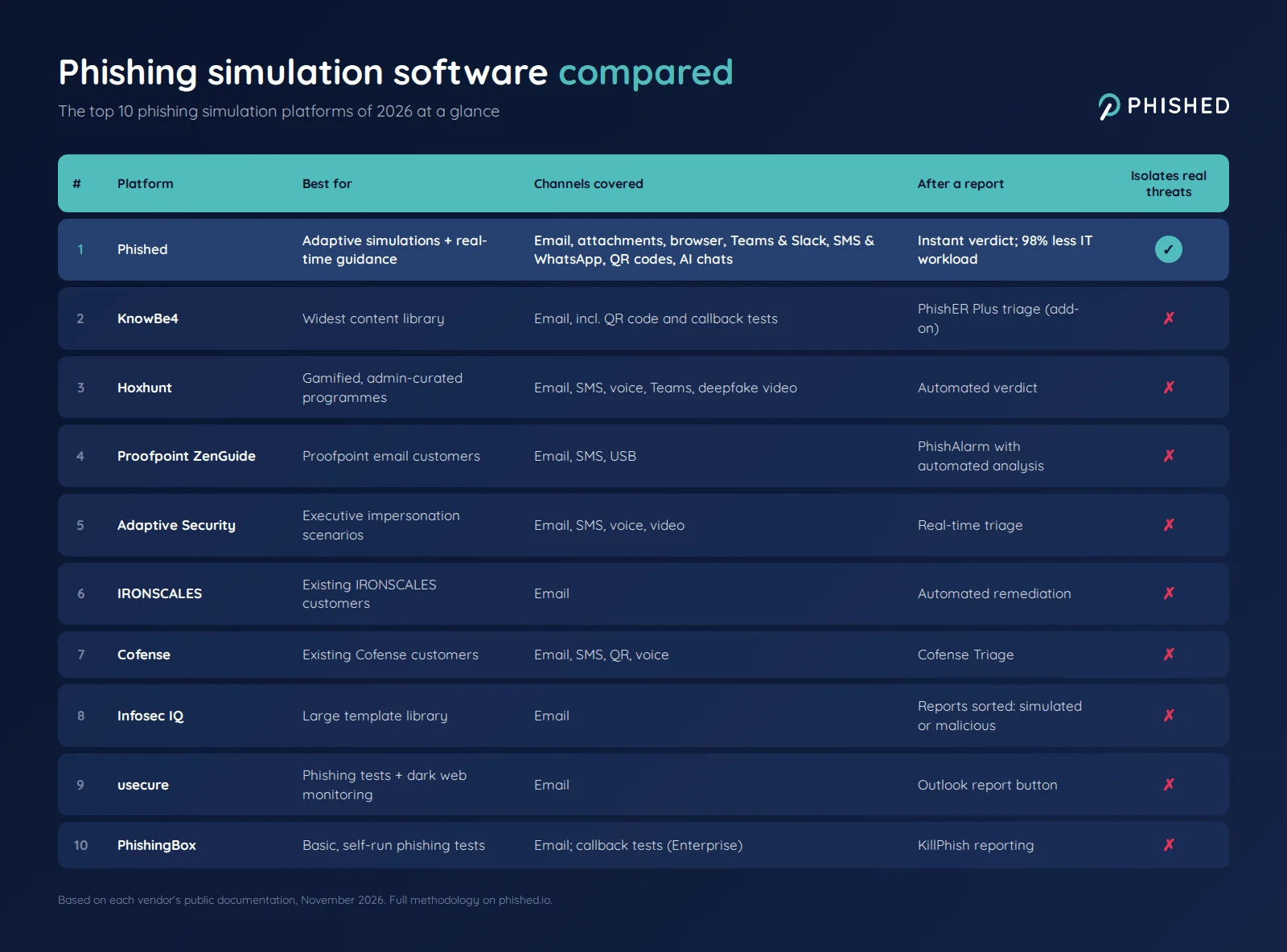
| Platform | Best for | Channels covered | After a report | Isolates real threats | Pricing |
|---|---|---|---|---|---|
| Phished | Adaptive simulations + real-time guidance | Guidance and protection across email, attachments, browser, Teams & Slack, SMS & WhatsApp, QR codes and AI chats | Instant feedback and a verdict; 98% less workload for IT | ✓ | From $175/mo (published) |
| KnowBe4 | Widest content library | Email, including QR code and callback tests | PhishER Plus triage (optional add-on) | ✗ | Quote-based tiers |
| Hoxhunt | Gamified programmes curated by admins | Email, SMS, voice, Teams, deepfake video | Automated verdict on reported emails | ✗ | Per employee, quote after scoping call |
| Proofpoint ZenGuide | Proofpoint email-security customers | Email, SMS, USB | PhishAlarm with automated analysis | ✗ | Quote-based |
| Adaptive Security | Executive impersonation scenarios | Email, SMS, voice, video | Real-time triage | ✗ | Quote-based |
| IRONSCALES | Existing IRONSCALES customers | Automated remediation | ✗ | Free Starter plan; paid plans quote-based | |
| Cofense | Existing Cofense customers | Email, SMS, QR, voice | Cofense Triage | ✗ | Quote-based |
| Infosec IQ | Large template library, hands-on teams | Reports sorted into simulated or potentially malicious | ✗ | Quote-based | |
| usecure | Phishing tests alongside dark web monitoring | Outlook report button | ✗ | Per user; free trial | |
| PhishingBox | Basic, self-run phishing tests | Email; callback tests on Enterprise plan | KillPhish reporting | ✗ | From $16.50/seat/yr at 50 seats (published) |
Capabilities and prices reflect each vendor's own published documentation in November 2026 and change over time; see the methodology below.
Free and built-in phishing simulation tools
Two options come up in almost every search for a free phishing simulation tool. Neither is ranked above, because neither is a complete simulation and training platform on its own.
GoPhish is an open-source phishing framework. It is free and flexible, but you host it yourself, set up your own sending domains and templates, and add training, reporting and risk scoring separately. It suits security teams running occasional tests, not organisation-wide awareness programmes.
Microsoft Attack Simulation Training is included with Microsoft Defender for Office 365 Plan 2, either as an add-on or as part of Microsoft 365 E5. For organisations already on those licences it is a low-cost way to start, though content, languages and automation are more limited than on dedicated platforms.
Frequently asked questions about phishing simulation vendors
Which phishing simulation vendors should I consider?
For most shortlists: Phished if you want adaptive simulations plus isolation at the moment of contact, KnowBe4 for the largest content library, Proofpoint ZenGuide if you already run Proofpoint email security, Adaptive Security for impersonation scenarios aimed at executives and finance teams, and Hoxhunt for gamified training. Cofense suits organisations that already use it for phishing response, while usecure and PhishingBox suit smaller teams that want basic, self-run phishing tests.
What is a phishing simulation platform?
A phishing simulation platform sends realistic but harmless phishing messages to your own employees, tracks who clicks and who reports, and trains them on the spot. See how Phished’s adaptive phishing simulations work in practice.
Which phishing simulation platform is best?
There is no single best phishing simulation software for every organisation. In this comparison Phished ranks first because its simulations adapt to every employee automatically and the Phished Assistant guides employees in real time when they meet a real threat on any channel, from email and the browser to chat, SMS and QR codes. KnowBe4 is the stronger choice if the size of the content library is your priority.
Which is better for phishing simulation, KnowBe4 or Phished?
KnowBe4 is the stronger choice if the size of the content library matters most. Phished is the stronger choice if you want simulations that run and adapt on their own, and real-time guidance and isolation for employees when they meet a real threat on any channel, from email and the browser to Teams, Slack, SMS and QR codes. Our Phished vs KnowBe4 comparison covers the full breakdown.
What is the best free phishing simulation tool?
GoPhish is the best-known free option: an open-source framework you host and configure yourself, without built-in training or risk reporting. Microsoft Attack Simulation Training is included if you already license Microsoft Defender for Office 365 Plan 2 or Microsoft 365 E5. Several commercial vendors, including PhishingBox and usecure, also offer free trials.
Are phishing simulations legal?
Yes, organisations may run phishing simulations on their own employees, but they need to be set up carefully. In Europe this means respecting GDPR principles such as transparency and data minimisation, and in several countries informing or consulting the works council first. Avoid lures that promise bonuses or exploit personal distress, and report results at group level rather than naming individuals.
Do phishing simulations work?
They help, but less than click-rate dashboards suggest. A long-term study at ETH Zurich and research presented at Black Hat USA 2025 both found that simulation-based training alone produces limited lasting behaviour change. Simulations work best as one part of a programme that also guides employees when they face a real threat.
How much does phishing simulation software cost?
Most enterprise vendors quote per user after a sales call. Published prices are rarer: PhishingBox starts at $16.50 per seat per year on annual billing, and Phished starts at $175 per month. Total cost also depends on admin time, so automated platforms can be cheaper to run even when the licence costs more.
How do you run a phishing simulation campaign?
Agree the goals and rules with HR, legal and, where relevant, the works council; inform employees that simulations will take place; start with a baseline test; then run varied, realistic scenarios at a steady rhythm rather than once a year. Give immediate, blame-free feedback to anyone who clicks, make reporting easy, and track reporting rates as well as click rates.
Methodology and sources
The shortlist combines independent inputs, so that no single vendor's own ranking decides who appears:
- Search visibility: the platforms named in the top organic results and Google AI Overview for "phishing simulation platform", "phishing simulation software" and "phishing simulation vendors" (US, October 2026), including independent and vendor-published comparisons.
- AI answers: the vendors that ChatGPT, Gemini, Google AI Mode and Perplexity recommended for the question "Which phishing simulation vendors should I consider?" (October 2026).
- Vendor documentation: each platform's own product, pricing and documentation pages, checked in October and November 2026.
The ten most frequently named commercial platforms were scored on the six criteria above. Ties were broken first by how often independent sources named the platform, then on channel coverage, then on language support. Free tools are covered separately because they are not complete platforms.
This guide was produced by Phished's content team, and Phished is one of the platforms compared. Every vendor is assessed against the same criteria, each gets three pros and three cons, and the reasoning behind each position is set out in its entry. Products change, so treat this as a snapshot; we revisit the page when capabilities change materially.
Last updated: November 2026
Which phishing simulation platform is right for you?
Start from what you are optimising for. If it is the largest content library, KnowBe4 is hard to beat. If you want simulations that run themselves, plus guidance and isolation on every channel for the employees that tests never reach, that is what Phished is built for.
Book a Phished demo